Beauty Camera -AI Photo Editor
- 4.3
- Rating
- 1.00M
- Installs
- Free
- Price
 Analysis by App-foxy
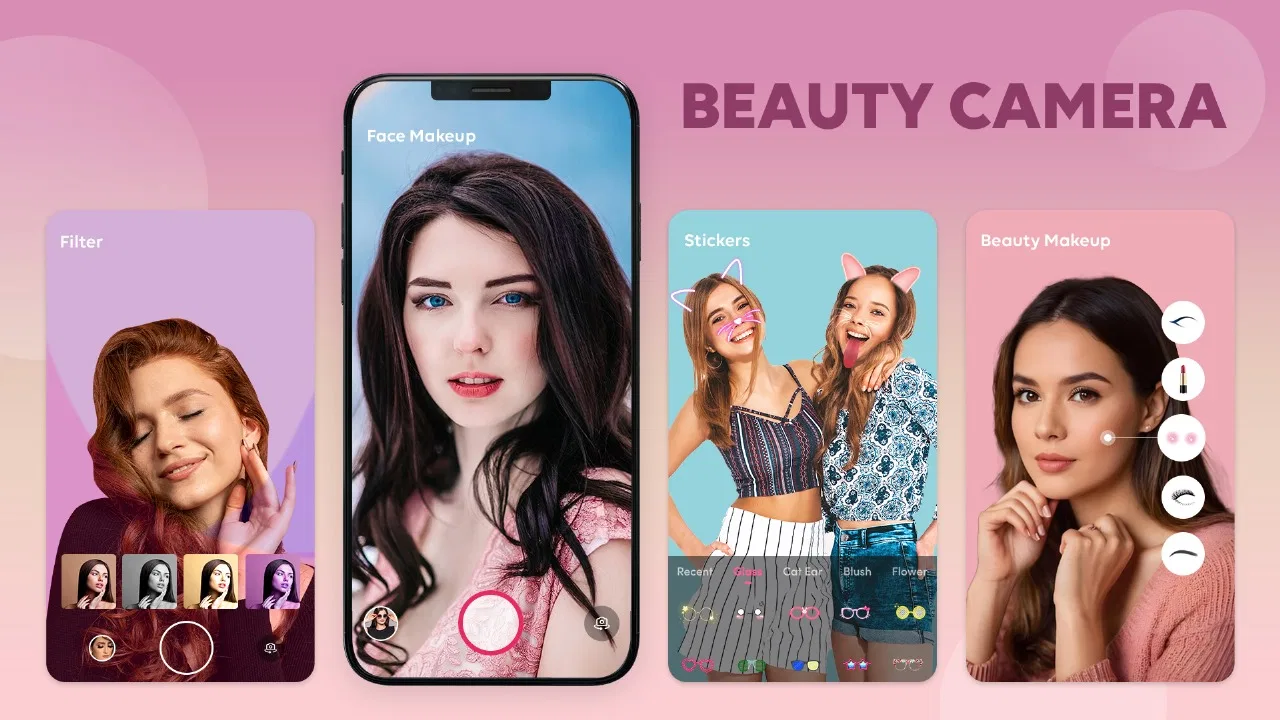
I usually notice the weaknesses in a beauty editor before I notice its best effects. A good result depends less on pressing a “beautify” button and more on how well the app lets me move from an ordinary camera roll photo to a finished image without losing control. Beauty Camera -AI Photo Editor is aimed at that exact moment: a quick portrait that needs a little polish, a social post that looks unfinished, or a selfie where I want makeup and lighting adjustments without opening a more complicated editing suite.
After using it as a practical beauty camera rather than treating it as a collection of flashy filters, I found the app easiest to appreciate when I had a clear starting image and a modest goal. It combines effects, filters, makeup tools, and AI-assisted photo editing in one place. That makes it approachable, although the convenience also means the editing experience is less specialized than a dedicated retouching or professional photo app.
From an ordinary portrait to a shareable photo
I find the most useful way to judge a portrait editor is to ask whether it helps me reach a good result without turning a quick task into a project. This section follows that everyday path, from choosing a photo to deciding how much polish it really needs. A few small choices up front can make the editing feel both quicker and more believable.
You May Also Like

 Blood Strike: 2.5 Anniversary
Blood Strike’s Loadouts Turn Every Drop Into a Tactical Gamble
A close look at Blood Strike’s custom loadouts: how fast access to signature weapons reshapes its battle royale rhythm, rewards preparation, and narrows the gap between fights.

 Pandora - Music & Podcasts
Pandora’s Music Is Easy to Start, but Harder to Recover
Pandora’s strength is its low-effort path from a seed to a station. Its weak spot is how much confidence it asks you to place in connection, setup, and quiet recovery.

 8 Ball Pool
 Is Built on Rivalries, Rematches, and Routine
A close look at the rivalries, rematches, shared routines, and unanswered safety questions that turn a quick pool match into a persistent mobile community.

 Samsung Music
’s Quiet Strength Is Playing What You Already Own
Its reach comes less from spectacle than from dependable access to a personal library. That simplicity is both the app’s strongest retention engine and its ceiling.

 AccuWeather: Weather Radar
AccuWeather Review: A Quick, Clear Forecast for Everyday Decisions
For everyday plans, the best forecast is the one you can understand quickly. AccuWeather makes rain timing, radar, and local conditions easy to act on, with a few trade-offs.

 Hill Climb Racing
Why Hill Climb Racing Still Turns Crashes Into One More Run
A tiny car, a bumpy hill and one more upgrade: Hill Climb Racing keeps resurfacing because its simple chaos makes every near-miss feel personal.
More From Our News Desk
View All News


Starting with the right photo
The best workflow begins before any effect is applied. I get more natural results from a front-facing portrait with even light, a reasonably clear face, and enough space around the head and shoulders. When the source image is already very dark, heavily blurred, or taken from an extreme angle, automatic beauty adjustments have less useful information to work with. The app can still make the picture look different, but not necessarily better.
For an everyday example, imagine taking a quick portrait before meeting friends. The photo is usable, but the room light is uneven and the skin looks dull on the phone screen. Instead of opening a full desktop-style editor, I would import that image, test a light enhancement, and then decide whether a filter or makeup adjustment actually helps. That order matters: starting with a strong effect can hide the original problem rather than solve it.
This is also where the app feels more welcoming than many advanced alternatives. I do not need to understand curves, masks, or detailed color channels to begin. Kamrej Apps has positioned the experience around familiar visual controls, so a first-time editor can experiment without feeling that every choice has a technical consequence.
Building the edit in stages
I prefer to work in small steps. First I look at the overall appearance, then I try a filter, and only after that do I consider makeup or face-focused changes. A filter can already alter color and contrast, so adding strong makeup on top may create an exaggerated result. Keeping the adjustments light gives me a better chance of preserving recognizable features and natural skin texture.
The AI-oriented tools are most useful when they save time on a simple portrait rather than when I expect them to perform a complete professional retouch. They help turn a basic image into something more presentable with less manual effort. That is valuable for casual sharing, profile images, and quick personal posts, where spending several minutes refining tiny details is not worthwhile.
One practical habit I recommend is checking the image at normal viewing size after every major change. A face can look smooth and bright while zoomed in, yet seem artificial when viewed as a whole. I also compare the edited image with the original before saving. This quick pause prevents the common mistake of confusing “more noticeable” with “more flattering.”
Using filters without losing the subject
Filters are useful when the original lighting has a mood problem, but they should support the portrait rather than become the main subject. I tend to test a few options briefly, then return to the least distracting one. A strong color treatment may look attractive in the editor and still be a poor match for the setting, clothing, or skin tone.
The app works particularly well for people who want a fast visual change and do not want to assemble several separate tools. In a conventional workflow, I might use one app for color, another for face retouching, and a third for makeup effects. Keeping those stages together reduces the need to export and re-import the same image. The trade-off is that a single beauty-focused app may not offer the same depth as a dedicated color editor.
I would also avoid applying a filter simply because it is the first option I see. A better approach is to decide what the photo needs: warmer color, a cleaner overall look, a little more brightness, or a playful style. That small decision makes the process faster and produces edits that feel intentional instead of randomly decorated.
Adding makeup with restraint
The makeup tools are best treated as finishing controls. I use them when the portrait needs a little definition or when I want a clearly styled look for a casual post. They are less suitable when I am trying to reproduce real cosmetics precisely, because a phone editor cannot replace the control of choosing actual products, applying them under real lighting, and seeing how they behave from different angles.
A useful workflow is to make one makeup change at a time and inspect the edges around the face. Hair, glasses, hands, and unusual lighting can make automated effects look less convincing. If the result draws attention to the edit before it draws attention to the person, I reduce it or remove it. This is one of the app’s main judgment calls: the tools make experimentation easy, but they do not decide what looks appropriate for every photograph.
For a profile image, I would keep the makeup and filter subtle. For a themed selfie or a playful image shared with friends, I would be more willing to push the style. The same feature can therefore feel either useful or excessive depending on the purpose of the picture.
Managing the handoff from editing to saving
The final handoff is easy to overlook. Once I like the appearance, I check whether the image still looks clear at the size where I plan to use it. A picture intended for a messaging profile has different needs from one displayed full-screen. I also keep the original until I am satisfied with the finished version, because a beauty edit is not always reversible once I move on to another image or close the editing session.
This simple original-to-final comparison is especially important with AI-assisted changes. Automatic tools are convenient because they make decisions quickly, but convenience can hide small changes around facial features or skin texture. I want the final image to look like a better version of the same moment, not like a different person placed into it.
For occasional users, this streamlined handoff is one of the strongest reasons to choose the app. It avoids the learning curve of a more technical editor. For photographers who need layered corrections, precise selections, or repeatable settings across many images, the same simplicity becomes a limitation rather than an advantage.
What the finished result feels like
When the source photo is suitable and the adjustments are controlled, the result is quick, clean, and ready for everyday sharing. The app is not trying to make me manage a complete studio workflow. Its value is the short path between “this portrait is almost right” and “I am comfortable sending or posting it.”
I particularly like the flexibility between a nearly natural edit and a more obvious beauty look. I can use a small amount of correction for a work-related profile picture or explore stronger effects for a casual selfie. That range makes the app more useful than a camera that only applies one recognizable style.
Still, the finished image depends heavily on restraint. If I combine a dramatic filter with heavy smoothing and prominent makeup, the result can quickly lose the details that made the original portrait feel personal. The app gives me the controls, but good results still come from stopping early.
Where the workflow breaks down
The biggest weakness is not the number of tools; it is the uncertainty that comes with automated beauty editing. Face detection and appearance adjustments are most convincing on clear, front-facing portraits. Crowded backgrounds, unusual poses, low light, and partially covered faces can make the result less consistent. I would not rely on it for an important image without checking the entire frame carefully.
There is also a creative ceiling. Compared with a dedicated photo editor, this app is less appealing when I need exact control over exposure, selective color, perspective, or detailed object removal. Compared with a specialized makeup simulator, it may feel less focused for someone who wants to compare precise cosmetic looks. Its middle ground is useful, but users with a very specific editing discipline may prefer separate tools.
The free entry point makes it easy to try, while in-app purchases are listed at $7.99 per item. That means I would test the everyday workflow first rather than assuming every desirable tool belongs to the free experience. If I only edit a portrait once in a while, paying for individual extras may not make sense. Someone who regularly uses beauty effects may find the convenience more worthwhile, but should still judge each purchase by how often it will actually be used.
Another point is device compatibility. The app requires Android 8.0 or later, so it is not aimed at very old Android phones. On a supported device, the current version, 1.46, gives users the version of the app currently intended for this workflow. I would still keep enough free storage available for working with photos and avoid judging an edit while the phone is struggling with several open apps.
Who will get the most from it
I would recommend it to someone who wants a friendly all-in-one portrait editor, especially if the main goal is speed. It suits casual selfie editing, quick profile-picture updates, simple beauty adjustments, and experimenting with filters without learning a professional interface. The Everyone content rating also makes it broadly approachable for general users, although younger users should still make sensible choices about what they edit and share.
The app has already reached over a million installs and holds an average rating of 4.2 from around three thousand ratings, which fits my impression of a tool designed for accessible everyday use rather than specialist production. Those figures suggest that its appeal is easy to understand: it offers a familiar path from portrait to polished image and does not demand much technical knowledge.
I would skip it if my priority were highly controlled retouching, consistent batch processing, or serious color work. I would also look elsewhere if I dislike AI-assisted changes on principle or want every adjustment to be made manually. A standard photo editor is a better choice for precision, while a dedicated makeup app may be better for testing a narrow range of cosmetic styles.
My practical recommendation
My advice is to use the app as a light-touch finishing tool. Choose a clear original, make the smallest correction that solves the visible problem, test filters for mood rather than novelty, and inspect the complete image before saving. If you are editing a portrait for a public profile, ask whether the final version still looks believable at a glance. If you are making a playful image for friends, you can be more adventurous.
The real strength is the short, approachable workflow from ordinary portrait to usable final image. It brings camera effects, filters, makeup, and AI-assisted enhancement into one beauty-focused app, which is convenient when I want results quickly. Its main weakness is the same simplicity: it cannot replace a precise editor, and automatic effects need human judgment.
For a free beauty app from Kamrej Apps, Beauty Camera -AI Photo Editor is worth trying when convenience matters more than deep control. I would not use it for every kind of photograph, but for the everyday scenario of improving a selfie before sharing it, the process is direct, flexible, and easy to understand. The best results come from treating it as a helpful assistant, not as a button that can make every photo perfect.
FAQs for Beauty Camera -AI Photo Editor
01What features does the Beauty Camera - AI Photo Editor offer?
The Beauty Camera - AI Photo Editor offers a range of features including skin smoothing, blemish removal, teeth whitening, and eye enhancement. Additionally, it includes filters, stickers, and makeup effects. The app’s AI technology ensures real-time editing, providing a seamless experience for users who want to enhance their photos effortlessly.
02Is the Beauty Camera - AI Photo Editor free to use?
The app is free to download and use with basic features. However, it offers in-app purchases and a subscription model for premium features, such as advanced filters and ad-free usage. Users can try these premium features with a free trial before committing to a subscription.
03Can I use Beauty Camera - AI Photo Editor without an internet connection?
While some basic editing features can be used offline, an internet connection is required for accessing certain features, updates, and cloud storage capabilities. For optimal performance and to enjoy all functionalities, it’s recommended to use the app with a stable internet connection.
04Is my data safe with Beauty Camera - AI Photo Editor?
The app prioritizes user privacy and data security. It complies with standard data protection regulations, ensuring that personal photos and information are stored securely. Users can review the app’s privacy policy for more details on data handling practices and security measures employed.
05Does Beauty Camera - AI Photo Editor support all devices?
The app is compatible with most Android and iOS devices. However, some older devices may experience limitations or reduced performance due to hardware constraints. It’s advisable to check the app’s compatibility with your device before downloading to ensure a smooth experience.
Pros
- User-friendly interface for quick editing.
- Wide range of filters and effects.
- AI enhancements are impressively accurate.
- Supports high-resolution editing.
- Regular updates with new features.
Cons
- Contains occasional intrusive ads.
- Some features require in-app purchases.
- Limited free version options.
- Can be resource-heavy on older devices.
- May require internet for some features.

Beauty Camera -AI Photo Editor
Gallery